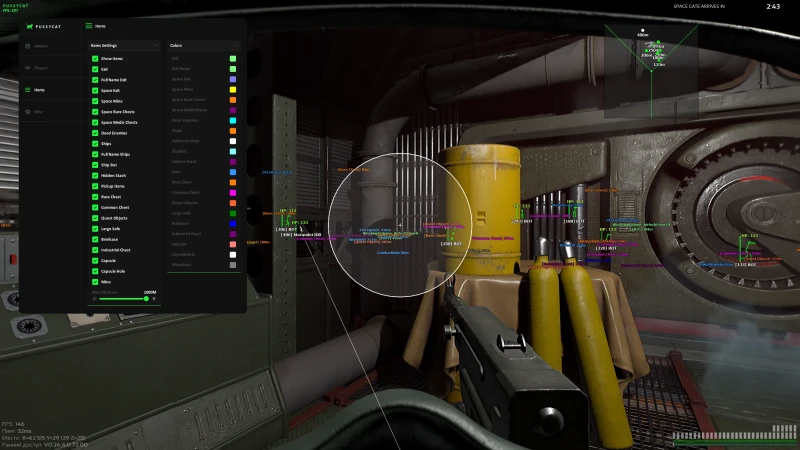
Levo Cheats Marathon Cryo is a premium suite of undetected Marathon cheats built for Bungie's high-stakes extraction shooter. These Marathon cheats deliver full Visual ESP with 2D boxes, skeleton lines, and loot highlighting, plus a precision aimbot with bone selector, recoil control, and adjustable FOV for every firefight. Our Marathon cheats are maintained for current BattlEye patches so you always know what to expect before you buy. Pair Marathon cheats with Cloud DMA when you want the most isolated stack Levo Cheats offers. Free updates during your key and setup help included.
Always check live status before launch — especially after a game or anti-cheat update.
System requirements
Launcher: Steam (fully compatible)
Operating System: Windows 10 (all versions) or Windows 11 (all builds up to 25H2)
Cheat Type: External — requires Core Isolation and Exploit Protection to be disabled
BIOS: Secure Boot disabled recommended
Step-by-step instructions and video guide included after purchase
Internet: Stable broadband connection required
Note: Marathon uses BattlEye anti-cheat — always use the latest loader for safety
Cloud DMA required for full functionality.
Features
20 modules included
Features20
Visual ESP
2D Box — Outline boxes around nearby players and hostiles
Skeleton Lines — Bone-structure highlights for clearer target reads
Loot ESP — Highlights valuable pickups in range
Distance ESP — Range to nearby contacts
Info Color — Customize ESP colors to your preference
Player Range — Set max distance for player and AI ESP
Loot Range — Control how far pickups appear on ESP
Player Alert — Get notified when enemies enter your vicinity
Show Ore & Plants — Mark resource nodes for efficient farming and crafting
Show Chests & Objects — Identify containers and interactive objects instantly
Aimbot Key — Hotkey to toggle aimbot
Visible Check — Aimbot only engages visible targets
Bone Selector — Choose preferred aim point (head, chest, neck)
Aimbot Smoothing — Tune aim movement for natural tracking
Aimbot FOV — Set the active aimbot radius
Recoil Control — Eliminates weapon recoil while firing
FOV Circle — Optional on-screen aimbot radius
CLOUD-DMA OPTION
AWS - option
How to buy
Key in hand in a few clicks.
Same path every time — check status, pick a plan, pay, then install from your portal.
01
Check status
Confirm the product is online before you buy.
02
Pick a plan
Choose your duration, then go to checkout.
03
Pay securely
Card, PayPal, or crypto — key unlocks instantly.
04
Install & play
Follow the guide, load a safe preset, and go.
FAQ
Can I use my Marathon Cryo license on more than one PC?
No, each Marathon Cryo license is tied to one PC at a time. If you need to switch machines, open a support ticket on our Discord and our team will assist you with the hardware transfer promptly.
Is Marathon Cryo difficult to set up?
Not at all. After purchase you receive step-by-step written instructions and a full video guide. The main steps involve disabling Core Isolation and Exploit Protection in Windows Security settings — both are fully covered in the guide we provide.
Will Marathon Cryo affect FPS or performance?
Marathon Cryo is a lightweight external client designed with minimal system overhead. The vast majority of users report no noticeable FPS drop during normal gameplay sessions.
What payment methods do you accept?
We accept card payments via G2A Rewarble Visa gift cards and cryptocurrency (Litecoin / LTC). After purchasing the correct gift card value on G2A, you enter the card code in our checkout to complete your order and place it for verification.
Cryo stopped working after a game update. What should I do?
Do not run the old loader after a Marathon game patch. Watch for our update notification in Discord — we typically patch within hours of each game update. Once we confirm it is safe, download the new loader via the mega.nz link we send and follow the updated setup instructions.
The overlay does not appear. What do I do?
Make sure Core Isolation and Exploit Protection are fully disabled before launching the loader. Also verify Secure Boot is off in BIOS. If the issue persists, open a support ticket on our Discord and our team will walk you through troubleshooting step by step.
How do I purchase Marathon Cryo?
Click the Buy Now button on this page, choose your plan (Monthly at $40 or Lifetime at $150), enter your email, select your payment method, and complete the checkout. After our team verifies your order, your access details are delivered instantly to your email and Discord.